
Quick take
- Ticket reports cover the requests that were actually recorded.
- A fast category count can add visibility to brief, repeatable support work.
- Standard minutes estimate planning effort; they do not measure time worked.
- Security, SLA, approval and audit requirements still belong in the formal service process.
The front desk has been open for 20 minutes. One employee swaps a failed mouse, another picks up a prepared laptop, and a third asks why an access card stopped working. A technician fixes each issue quickly. By lunch, several useful interactions have happened without becoming tickets.
That may be exactly what the local process allows. It may also create a blind spot. If leadership later treats ticket volume as the complete workload, the team’s walk-up and operational service work disappears from the planning conversation.
What “support workload” means here
Support workload is the estimated volume of effort created by recurring support activities. The method uses two inputs: an activity count and a standard number of minutes for that activity. It does not require a stopwatch, and it does not claim to show an individual technician’s actual handling time.
Counts alone are too flat. A five-minute access question and a 20-minute meeting-room assist are both one interaction, yet they create different planning demand. Standard minutes keep that distinction visible while staying intentionally simpler than time tracking.
Why ticket data is one part of the workload picture
Ticketing and ITSM platforms are the right place for incidents, service requests, ownership, SLAs, approvals and a durable work history. Their reports answer questions about that recorded system. Atlassian’s default Jira Service Management workload report, for example, lists the number of requests assigned to agents. That is a useful queue metric. An unrecorded handoff or hallway question cannot appear in it.
Depending on policy and operating model, work outside the queue may include:
- laptop, monitor, phone and accessory handoffs or returns
- brief password, SSO and badge-access questions
- status checks on an existing order or request
- short consultations at a support counter
- unplanned meeting-room or conferencing assistance
- incoming package, spare-part and hardware receipt
- quick help with a dock, headset, charger or mobile device
The organization still decides which of these require a ticket. A low-friction count is an additional planning record, never a waiver for required documentation.
Three ways to collect the signal
| Method | Capture effort | What becomes visible | Limit | Best fit |
|---|---|---|---|---|
| Count tickets only | No additional step when ticket discipline is already strong | Recorded requests, state, ownership, SLA and history | Work without a ticket is absent | Formal service management and auditable workflows |
| Track exact time | High; starts, stops and interruptions require upkeep | Detailed time records when consistently maintained | Friction, adoption, privacy and false precision | Billing or processes that require actual time records |
| Count categorized activities | Low; one category and an optional second choice | Volume, mix and estimated planning effort | Standard minutes are assumptions | Brief, repeatable work outside or alongside tickets |
A blended rule is often the cleanest. Work that needs ownership, follow-up or formal evidence becomes a ticket. Short, defined activities can be counted separately. Exact time is collected only where the business actually needs it.
A synthetic week outside the queue
83 activities produce 486 estimated minutes
This support point assigns a cautious standard value to five recurring activities.
| Activity | Count | Standard minutes | Estimated effort |
|---|---|---|---|
| Quick user questions | 36 | 4 | 144 minutes |
| Device handoffs | 16 | 8 | 128 minutes |
| Equipment returns | 10 | 6 | 60 minutes |
| Access assistance | 14 | 5 | 70 minutes |
| Unplanned support assists | 7 | 12 | 84 minutes |
| Total | 83 | – | 486 minutes = 8 hours 6 minutes |
Each row uses count × standard minutes. The result is a planning estimate. It is not eight hours and six minutes of proven labor, and it says nothing about any one employee’s performance.
One week is a weak basis for staffing action. Device rollouts, office moves, onboarding cycles and outages can distort it. Review several comparable weeks, flag missing days and keep unusual events in the narrative beside the numbers.
Set standard minutes without inventing precision
A standard time is a planning assumption for one activity category. A team can set it from practical experience, a limited sample or a joint estimate. The value should be reviewed when tools, processes or service scope change.
More categories do not automatically create better data. Split an activity only when the difference can lead to a different decision. “Laptop handoff” and “laptop handoff with setup” may deserve separate values. Fifteen nearly identical cable categories may add taps without improving the plan.
How CountPilot applies the method
CountPilot places common activities on large, configurable touch buttons. One tap records a count. A submenu can add a useful second level, such as a laptop handoff for installation, repair or secure erasure. Teams define labels, colors, symbols, categories and standard minutes around their own service point.
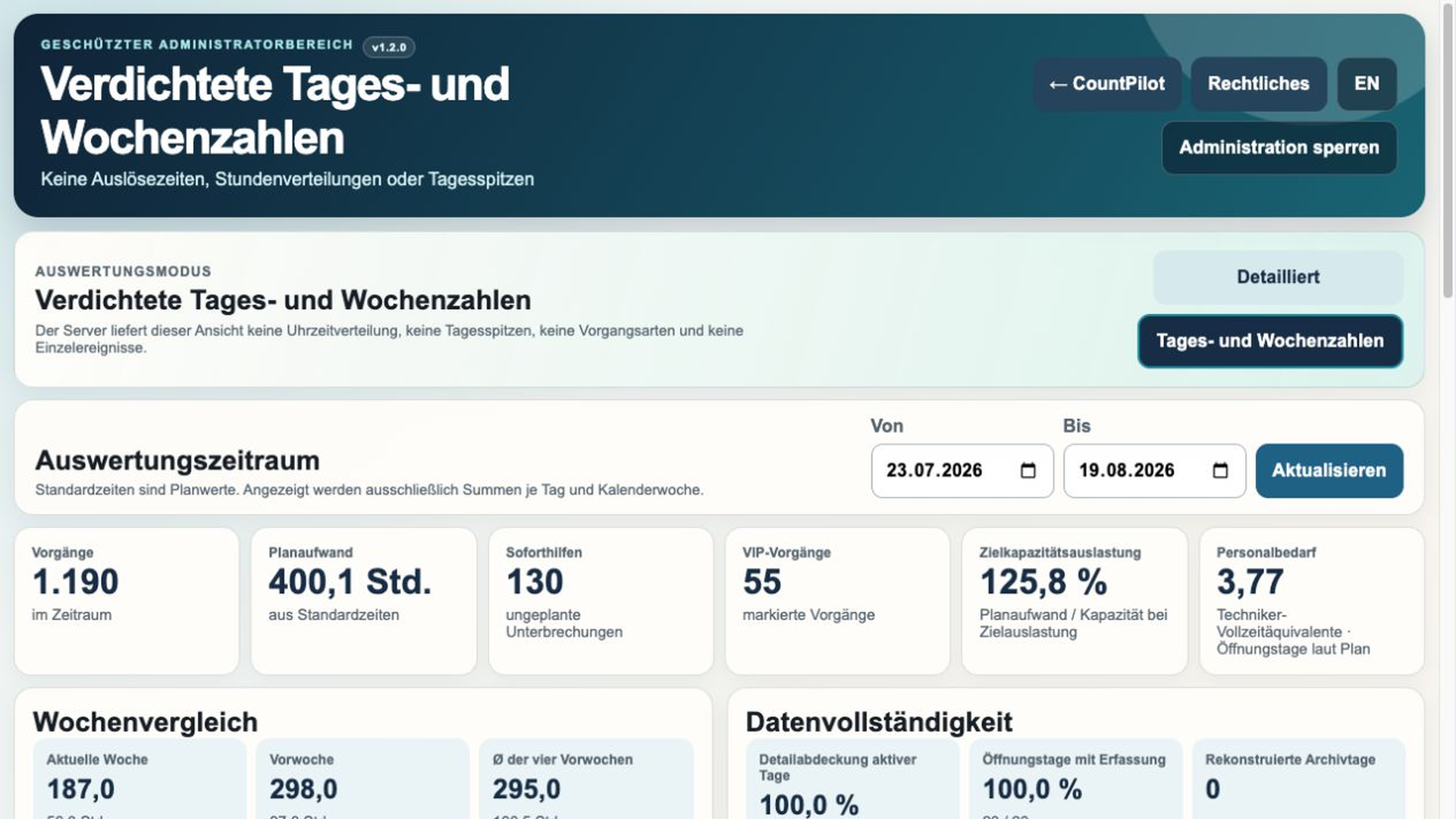
General mode records activities without assigning them to named employees. That is enough for many team-level workload questions. Optional employee mode is available when the organization has a defined reason to use it. Reports connect counts with standard minutes and can feed the next step: service desk capacity planning.
A practical rollout rule
- List the ten to fifteen recurring activities most likely to be missing.
- Remove any category that will not support a real decision.
- Give each remaining item a plain label and a conservative standard value.
- Write down the cases that always require a ticket.
- Run a four-week pilot and review misclassification and missing days.
- Discuss trends only after the capture habit is stable.
The interface is the easy part. The operating rule matters more. A technician should know within seconds whether to tap a category, open a ticket, or do both.
Frequently asked questions
Why are ticket counts sometimes incomplete?
They contain the requests that were created. Brief in-person help, handoffs and immediately resolved questions can sit outside that process.
Do we need minute-by-minute time tracking?
No. Category counts with standard minutes may be enough for a planning signal. Actual time evidence requires a different process.
What is a standard time?
It is a configured planning value for one activity type. It estimates effort and is not actual handling time.
Does CountPilot replace a ticketing system?
No. It complements ticket and ITSM processes with fast capture for recurring activities.
Can we use CountPilot without named employees?
Yes. General mode records activities without assigning them to named staff and supports team-level reporting.
Further reading
- Atlassian: Default reports in Jira Service Management – an official description of request, workload and SLA reporting inside the ticketed service space.
Related guides
TRY THE METHOD
Build a capture screen around your own service categories.
The 30-day evaluation runs locally and requires no account or payment details.