
Quick take
- Walk-up support covers unscheduled or in-person help at an internal service point.
- A brief handoff or answer does not always need a full ticket workflow.
- SLA, security, approval, follow-up and audit requirements still require the designated record.
- Team-level category reporting can work without assigning activities to named employees.
An employee walks into the tech bar with a dead mouse. While the analyst hands over a replacement, someone else arrives to pick up a laptop. A third person needs help reconnecting a phone to corporate Wi-Fi. None of the visits is dramatic. Together they shape the entire morning.
Ignoring those contacts understates demand. Forcing every two-minute exchange through a long form creates its own problem. The service design needs a defined fork: formal ticket, quick activity record, or both.
What counts as walk-up IT support?
Walk-up IT support is face-to-face or unscheduled help delivered at a tech bar, help desk counter, service window, workplace support hub or similar internal location. Employees may stop by to collect equipment, return a device, ask a quick question or get immediate troubleshooting help.
The term describes a service channel, not one universal workflow. ServiceNow’s Walk-up Experience supports in-person and remote assistance through designated locations, queues and appointments. A smaller internal counter may need far less machinery, but it still needs a rule for which interactions must become incidents or requests.
Common walk-up requests
These are example categories, not customer cases:
- mouse, keyboard, headset, charger or cable handoff
- laptop or mobile-device pickup and return
- short software, password, SSO or badge-access question
- dock, monitor or accessory swap
- smartphone setup or SIM-plan question
- urgent meeting-room, projector, network or conferencing help
- device intake for storage, disposal, repair or secure erasure
The right list comes from the location. A headquarters tech bar and a warehouse support window will not need the same buttons. Keep the main set small enough to scan in a second.
Ticket or quick activity record?
Write the decision rule before launch. If each analyst invents the rule while a line is forming, both service history and activity data become inconsistent.
| Situation | Ticket or formal record | Quick count may be enough | Why |
|---|---|---|---|
| Longer work or follow-up | Yes | No | Ownership, status and next actions must persist. |
| SLA-bound service | Yes | No | Response and resolution commitments need the system of record. |
| Security incident or suspicious access | Yes, under the security process | No | Escalation and evidence cannot be reduced to a category. |
| Approval or permission change | Yes | No | The authorization trail must remain auditable. |
| Short answer with no next step | Depends on policy | Yes | A category can make the demand visible. |
| Standard equipment handoff or return | When inventory or acknowledgment is required | Yes, alone or as an additional count | The interaction is brief and clearly defined. |
| Small fix completed immediately | When it repeats or needs follow-up | Yes | A quick record stays inside the service flow. |
Capture must fit the pace of the counter
If documenting a five-minute assist takes another five minutes, the record is likely to be delayed or skipped. That is a design observation, not a universal adoption statistic. The practical requirement is simple: the common path should take seconds.
Use one tap for frequent standard work. Add a second choice only when it changes later analysis. A laptop handoff may need installation, repair and secure-erasure destinations. A general question probably does not need ten subtypes.
The interface should acknowledge the tap immediately. If technicians enter several activities in quick succession, a visible queue count helps them see that records are pending and reduces anxious double entry.
Collect only the detail the decision needs
To answer “How many walk-up contacts did this location handle by category?” the minimum record may be date, category and optional subcategory. Standard minutes can add estimated planning effort. Employee name, requester name, free-text problem description and device identifier are not automatically needed for that question.
That does not make the record anonymous. Timestamp, location or a rare category may still allow an inference in context. The accurate phrase is “without assigning activities to named employees.” Purpose, access and retention still deserve an organizational rule.
Optional employee capture can support different schedule profiles. Enable it only where the extra personal detail serves a defined purpose. It is not a prerequisite for location-level demand or capacity analysis.
A lean starting model
Twelve main categories, one written ticket rule
The screen includes user question, access/SSO, laptop handoff, laptop return, phone handoff, phone return, accessory issue, accessory return, meeting support, package receipt, consultation and other activity. Submenus appear only for destination or component. The local process lists six situations that always require a ticket as well.
Review “other activity” every few weeks. A growing count may reveal a missing category. A consistently tiny count means the catch-all is doing its job.
How CountPilot supports a walk-up workflow
CountPilot is designed for fixed capture points and touch operation. Large buttons fill the available display. Administrators can arrange activities by subject, reorder them with drag-and-drop and add submenus. After capture, the interface returns to the appropriate starting screen.
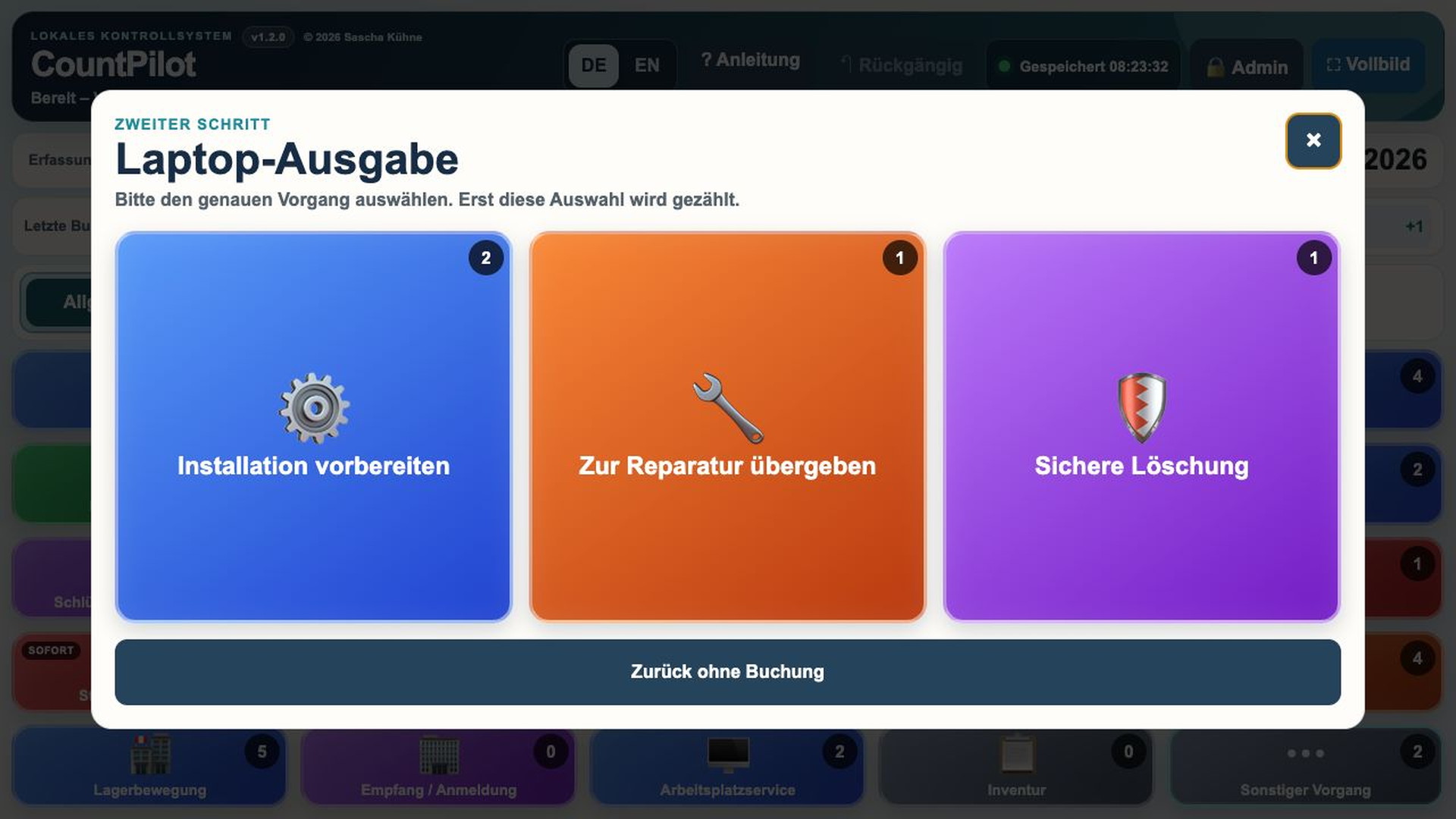
The product configuration controls German and English labels, icons, colors, standard minutes and categories. General mode does not assign activities to names. Reports can provide aggregated daily and weekly views, while detailed operating data remains available for justified administrative use.
For the next planning step, read how to track activity beyond ticket counts and build a service desk capacity view. The use-case page covers other internal service environments.
A six-step rollout
- Observe the most common contact types for one week before designing the full screen.
- Define every case that must enter a ticket or specialist system.
- Create eight to fifteen plain main categories.
- Use submenus only for distinctions that affect planning or routing.
- Start without named assignment unless the planning purpose requires it.
- After four weeks, review category quality, missing days and technician feedback.
Frequently asked questions
What is walk-up IT support?
Unscheduled or face-to-face IT assistance delivered at an internal counter, tech bar or similar service point.
Does every walk-up visit need a ticket?
No, when policy allows a brief contact to be handled without one. Longer, security-related, approval-based or follow-up work still needs the designated record.
Which walk-up activities should we track?
Frequent, clearly distinguishable contacts whose volume can support a later decision. Rare variants can begin under “other activity.”
Can we capture walk-up demand without employee names?
Yes. Category and volume reporting can work without assigning activities to named staff.
When is a ticket mandatory?
Common triggers include SLA commitments, security incidents, approvals, follow-up, longer work and required audit history. The organization’s policy controls the final rule.
Further reading
- ServiceNow: Walk-up Experience – an official overview of in-person and remote assistance through designated walk-up locations.
Related guides
TRY IT AT THE COUNTER
Test the workflow with your most common walk-up activities.
The local evaluation runs for 30 days with no registration or payment details.